Help & support
How can we help?
Setup guides and fixes for the most common problems. They are the same guides the apps carry offline, written out in full.

LumaMic
Connect your phone
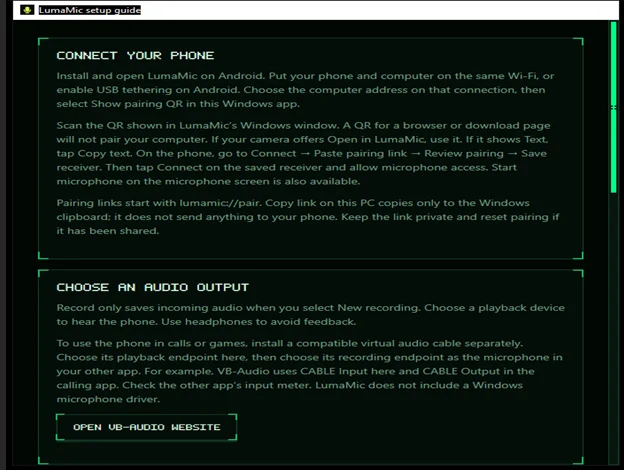
Your phone and computer must be able to reach each other: on the same Wi-Fi, or over Android USB tethering.
Open the receiver
Run LumaMic on Windows (or the Linux receiver). Choose the computer address your phone can reach.
Show pairing QR
Choose Show pairing QR on the PC. Scan it with the phone's camera. If the camera shows Text, choose Copy text on the phone.
Save the receiver
On the phone: Connect, Paste pairing link, Review pairing, Save receiver. Check the name, address and identity first.
Connect
Tap Connect on the saved computer. Saved means it's trusted; Connected appears only after the encrypted handshake.
If it won't connect
Read the message and the code first
Connect and Settings, Diagnostics show a plain message and a Code for the last failure. The code tells you which step failed: reaching the computer, the certificate, or the pairing key.
Check the firewall on Windows
LumaMic uses TCP port 46124 for audio and UDP port 46125 for discovery. Allow LumaMic on Private networks. In the Windows app, Check connection runs a local handshake and a read-only firewall check, and can copy a firewall command scoped to LumaMic's exact program, those two ports, Private networks and your local subnet. LumaMic never runs that command for you.
Make sure both devices are on the same network
Guest Wi-Fi and some office or hotel networks isolate devices from each other. Try USB tethering, your phone's hotspot, or a home network. Bluetooth tethering and a Windows Mobile hotspot also work when your hardware supports them.
The computer's address or certificate changed
If the PC's IP address changed, choose the new address in the receiver and pair again. If the receiver's certificate changed or you used Reset pairing, the phone will refuse it until you review and save the new pairing. This is deliberate: it stops another device pretending to be your PC.
The pairing link opened a web search
A lumamic://pair link belongs in LumaMic, not in a browser. Copy it, then open LumaMic, Connect, Paste pairing link. A QR code from a download page is not a pairing link.
The meter stays at "Very low" or "-inf"
The phone shows the raw microphone level before processing. Very low usually means the input is muted, covered, or (on an emulator) not passing a real microphone. Check Settings, Audio for the selected input, and Session health for permissions.
The recording stopped by itself
A recording stops automatically after 15 minutes with no voice, so a forgotten take can't run for hours. The file is closed properly and stays in Recordings. The microphone and stream stay on.
Use your phone as a microphone in other apps
Recording into LumaMic works on its own. To pick your phone as the microphone in Zoom, Teams, Meet, Discord, OBS or a game on Windows, LumaMic uses VB-Audio's free VB-CABLE:
- In LumaMic on Windows, open Routing, then Calls and games. It shows what your PC already has.
- Press Install Microphone Support. LumaMic checks the package first; Windows asks for permission. Press Install Driver in VB-Audio's window, then restart the PC.
- Press Set Up to send LumaMic into the cable.
- In your other app, choose CABLE Output as the microphone. Or press Make Default Microphone so every app set to Default uses the phone; Restore Previous Microphone undoes it.
VB-CABLE is made by VB-Audio, who accept donations at vb-cable.com. Use headphones when you monitor your voice, to avoid feedback. Never disable Windows driver signature checks to install audio drivers.
LumaMic Pro
How do I unlock LumaMic?
Install LumaMic from Google Play. The first screen explains what it does and shows the price; press Unlock. One purchase unlocks the whole app, with no subscription.
I bought it before. How do I get it back?
On the unlock page, press Restore Purchase while signed in to Play with the same Google account.
The PC says "This PC needs LumaMic Pro"
The Windows app unlocks when a phone with LumaMic Pro connects to it. Connect once from your Pro phone; after that the PC works offline. Pairing itself never needs a purchase. The phone shows "LumaMic Pro needed" for the same reason.
"This copy of LumaMic didn't come from Google Play"
Your copy was re-signed by someone else and can't unlock. Uninstall it and press Open Google Play to install the official app.
Hear yourself says "Plug in earphones"
Hear yourself never plays on the phone's own speaker, because it sits next to the microphone and would howl. Connect wired earphones, a USB headset, a hearing aid or Bluetooth (which adds a short delay).

ProxyBridge
Not connecting?
Work through these in order. Each one matches a step in the app's own connection check.
Check the proxy
Open Profiles, Compare proxies. A failed check names the step that failed: the address, the login, or the website test.
Wrong type
A SOCKS5 proxy saved as HTTP (or the other way round) connects and then fails. Edit the proxy and try the other type.
Wrong login
"Login rejected" means the username or password is wrong, or your provider only allows your home IP. Many providers have an IP allow-list in their dashboard.
Connected, nothing loads
Turn on Block QUIC (UDP 443) in the proxy's settings: most proxies can't carry QUIC, and apps then fall back to normal HTTPS. The stall watchdog also rebuilds a tunnel that stops passing traffic.
Expired or out of data
Paid proxies stop when the plan ends or the data runs out. Check your provider's dashboard. ProxyBridge can remind you before a plan expires.
Still stuck
Settings, Help & Support, Report a Problem prepares an email with a redacted report. You read it and choose whether to send it.
Proxy URL formats
socks5://user:pass@proxy.example:1080
socks5s://user:pass@proxy.example:443
http://user:pass@proxy.example:8080
https://user:pass@proxy.example:443
proxy.example:1080:user:pass
Percent-encode reserved characters, such as %40 for @. You can also share lists to ProxyBridge, or open .txt, .json and .conf files.
Stay protected all the time
The kill switch protects you while ProxyBridge is running. To stay protected if the app is closed or the phone restarts, use Android's own settings:
- Turn on Always-on VPN for ProxyBridge.
- Turn on Block connections without VPN.
- Allow ProxyBridge to run in the background.
Shield checks all three and has a one-tap shortcut for each.
The exit IP isn't showing
ProxyBridge checks your exit IP through the proxy with seven services in turn. When none answers, the yellow box says why:
No answer in time
Every check service timed out through this proxy. The proxy may be slow or overloaded. Press Refresh IP, or try another proxy.
Check sites refused or rate-limited this proxy
Some providers block "what is my IP" sites, or the sites limit busy proxy IPs. ProxyBridge then asks Cloudflare and api.ipify.org, which usually still give the IP. Your other apps are not affected.
"Exit IP found · no map location"
A service gave the IP but not its location, so there's no globe pin. The hidden or not-hidden verdict still works. When a country has a single time zone, the timezone card still works too.
Proxy refused the login, or is unreachable for the check
Check the username and password, and whether your provider only allows certain IPs. Tap the box for each service's answer, including the exact technical error.
ProxyBridge Pro and widgets
Unlock or restore Pro
- Settings, then ProxyBridge Pro: press Unlock Pro to buy, or Restore Purchase on a new phone with the same Google account.
- Pro Unavailable Here means this copy didn't come from Google Play, or Play isn't signed in.
- UNOFFICIAL COPY means someone re-signed the app. Uninstall it and install ProxyBridge from Google Play.
Add a widget (Pro)
- Settings, then Widgets, QR & Subscriptions: Add One-Tap Connect, Live Speed or Status.
- If your launcher can't add widgets from an app, long-press the home screen and use its Widgets list.
- One-Tap Connect asks for Android's VPN permission the first time, like the app.
Use ProxyBridge with your PC
Same Wi-Fi
Connect your phone and PC to the same Wi-Fi, or turn on the phone's hotspot and join it from the PC.
Start sharing
Settings, Advanced tools, LAN Sharing (Pro). Pick the proxy and tap Start Sharing.
Set the PC proxy
Tap Copy Client Settings. On Windows: Settings, Network, Proxy, Manual setup. Enter the host, port, username and password.
Browser only
Firefox has its own proxy settings, or use Copy PAC URL as the automatic configuration address.
Sessions last 15 minutes, for up to 8 devices, TCP only. Sharing stops if your Wi-Fi or Ethernet network changes; connecting the VPN doesn't stop it. Use trusted networks only.
Set up your own proxy
- What you need: a small server (VPS) you control, near the sites you use.
- SOCKS5: install a SOCKS5 server such as Dante or 3proxy, turn on username and password login, and open its port. Never run an open proxy without a login.
- HTTP: install Squid or tinyproxy with basic login and save it in ProxyBridge as HTTP.
- SSH:
ssh -D 0.0.0.0:1080 user@serveron a PC turns that PC into a SOCKS5 proxy for your phone on the same Wi-Fi. - Stay safe: use a long random password, keep the server updated, and allow only your own IPs if you can.
Where do I get a proxy?
ProxyBridge doesn't sell proxies or recommend any company. It connects to a proxy you already have.
- Paid providers sell SOCKS5 and HTTP proxies. Look for a trial or refund policy, a clear location list, username and password login, and support that answers.
- Free proxy lists are usually slow, short-lived and run by strangers who can see unencrypted traffic. Don't send logins through them.
- Your own is the safest option.
- Work or school: ask for the type, host, port and login, and check you're allowed to use it on your phone.
Report a problem
Send us the details, safely
Both apps build reports that leave out passwords, pairing keys and private paths. Nothing is sent automatically.
ProxyBridge
Settings, Help & Support, Report a Problem. It prepares an email with a redacted report. You read it, choose who gets it, and send it yourself.
LumaMic
Settings, Diagnostics or Session health, then Copy. The copy excludes pairing credentials, private paths and hardware identifiers, so you can paste it into a message.
A support address will be published with each app's store release. Until then, review builds are supported directly by the developer.