
Your phone is the microphone
LumaMic streams your Android phone's microphone to your computer over an encrypted, paired connection. Use it as the microphone in Zoom, Teams, Meet, Discord or OBS, record and edit voiceovers on the phone, or finish them in the Windows studio. All of it runs on your own devices.
Overview
Three ways to use it
Use one mode or all three. Each one starts only when you press a key, and the phone shows a notification with Stop while the microphone is on.
Stream to your PC
Pair once with a QR code or link, then connect in one tap. Audio travels over TLS straight to your computer, with no cloud in between. Send to up to three computers at the same time.
Record on the phone
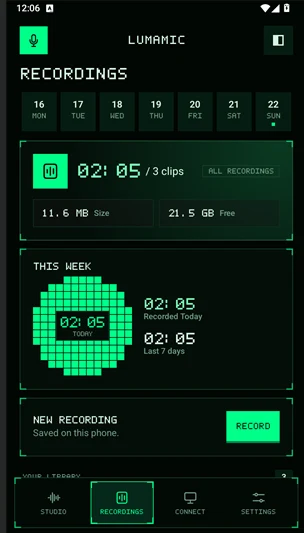
No computer needed. Record a WAV on the phone, then play, edit, rename, share or export it. If you connect to a PC mid-recording, the recording keeps going without a restart.
Listen to your PC
Turn it around: play your computer's sound on the phone with Listen to PC audio. It uses the same trusted pairing, and stops cleanly when headphones disconnect or you press Stop.
Features
Built for clean, reliable voice
An original audio engine written on Android's own APIs. No third-party audio or UI libraries: the only outside library is Google Play Billing, used for the Pro purchase.
Live Studio
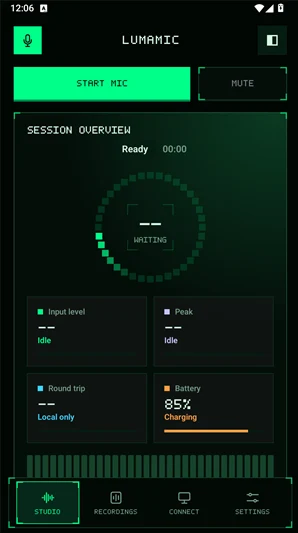
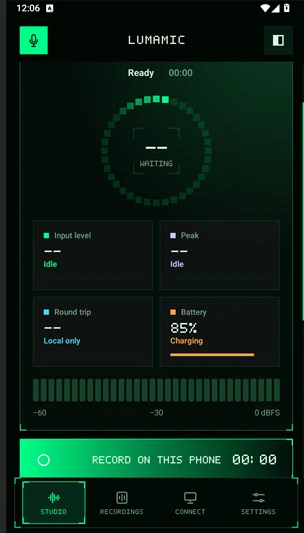
Start Mic, Mute and Record keys, a pixel level ring, and four live tiles: input level, peak, round-trip time and battery. Every figure is measured, never simulated.
Encrypted pairing
Direct TLS to your receiver. Its exact SHA-256 certificate fingerprint is checked before sign-in, and pairing details are encrypted with Android Keystore (AES-GCM).
Up to three PCs
One microphone session can feed three paired computers. Each has its own connection and status, and you can stop one without touching the others or your recording.
Voice processing
Low-cut filter, adjustable gain, a smooth noise gate and an always-on peak limiter that prevents clipping. Uses the phone's own noise suppression when available.
Speech cleanup
An optional spectral speech cleanup, off by default, for noisy rooms. Turn it off for music. Everything is processed on the device.
Lossless & tunable
Responsive, Balanced or Stable send buffers, plus negotiated lossless compression that keeps every sample. Older receivers fall back to plain PCM automatically.
Nearby computers
Connect scans your local network for LumaMic receivers. Found computers still need your QR or link to pair, and scanning never sends credentials.
Quick Settings tile
Start or stop the microphone from the notification shade. An idle tile opens the app first, so the mic can never switch on silently.
Silence auto-stop
A forgotten recording stops by itself after 15 minutes with no voice. The file is closed and stays playable, and you get a notification.
Session health
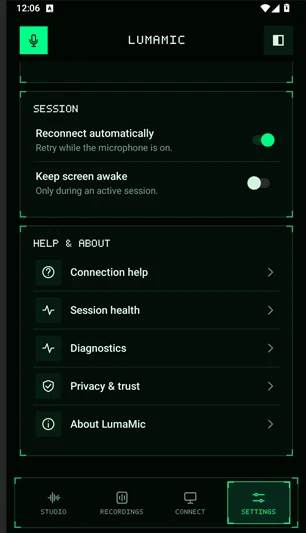
A read-only check of permissions, power restrictions, notifications, recording space and the input in use. Diagnostics you can copy never include credentials.
Inputs & presets
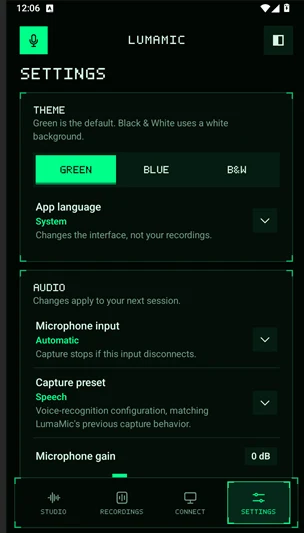
Pick a real input device (USB or headset mics that Android exposes) and a capture preset: Speech, Standard, Camera or Unprocessed. LumaMic verifies the route before sending.
English & Hindi
Key connection, recording, appearance and help flows are available in English and Hindi, or follow the system language. Plus Green, Blue and Black & White themes.
Mic for Zoom & Teams
Pick LumaMic as the microphone in Zoom, Teams, Meet, Discord or OBS. The Windows app sets up the free VB-CABLE driver and can make it your default microphone, then put your old one back.
Several phones, one PC
Up to four phones can feed one computer, mixed into a single microphone for interviews and podcasts. The PC shows each extra phone with its own level.
Hear yourself
Listen to your own voice live through wired earphones, a USB headset, a hearing aid or Bluetooth, with up to 18 dB of boost. It never plays on the phone's own speaker, so there is no howl.
Teleprompter
Read your script while you record: words-per-minute pacing, a reading line, text size and mirror mode, with Start & Record on the phone.
Meeting preset
Android's call processing for Discord, Zoom and Teams, plus Echo cancellation and Auto gain switches. Where a phone lacks an effect, the switch says so instead of pretending.
Send recordings to PC
Send a phone recording to a paired computer over the same encrypted link. The PC checks every byte, never overwrites a file, and can open it in Studio for offline transcription.
Phone editor
Edit on the phone, keep the original
The recording editor saves a new copy and never changes your original take. Close it any time: your draft is saved and comes back exactly where you left it.
- Outer trim and Remove a section: cut pauses and mistakes by their original times, shown in red on the waveform.
- Undo / Redo with up to 64 steps that survive rotation. Restore one section or all of them.
- Waveform zoom and pan plus a real spectrogram calculated from the recording's audio.
- Three-band voice EQ, a compressor (threshold, ratio, makeup) and separate tempo, speed and pitch.
- Background music with quiet levels and automatic ducking under your voice.
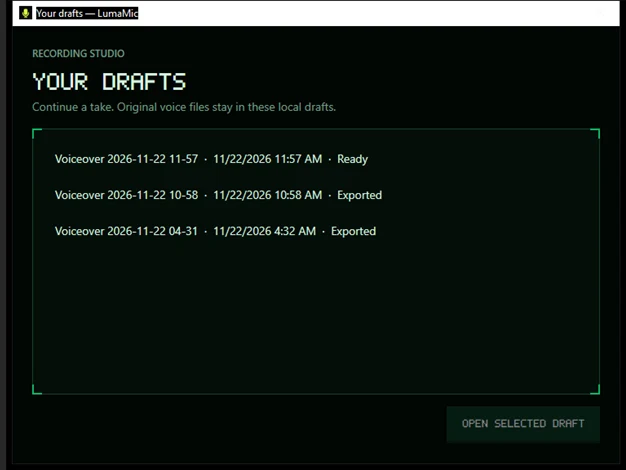
- Recoverable drafts that keep cuts, effects, music, transcript and view position.
- Manual transcript: type or paste text and save it as a TXT file beside the audio.
- Export a WAV or AAC/M4A copy through Android's file picker, or share it.
Windows & Linux
A voiceover studio on your PC
The Windows app is one self-contained x64 program: a receiver with live meters, a recorder, and Studio, a full voiceover editor. No separate runtime install is needed.
Receive & monitor
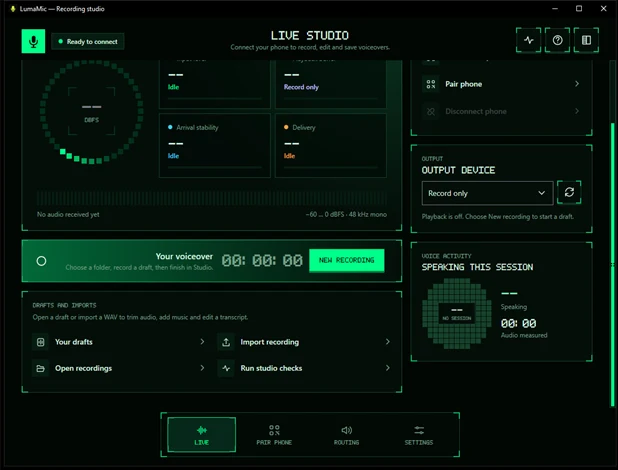
Live meter, playback buffer, arrival stability and delivery tiles, and a voice-activity disc. Play to any output device, or record only.
Record a voiceover
New recording with a project name, destination and optional background music. Pause and resume; recording goes into a draft you can always recover.
Studio editing
Trims, cuts, gain, fades, normalization, EQ, compression, noise cleanup, tempo, speed and pitch, with Undo/Redo and a frequency view.
Layered clips
Up to 16 extra voice or music clips on 8 lanes, each with its own position, trim, gain, mute and fades.
Transcripts & captions
Type a transcript, or use Windows' installed offline speech engine when available. Remove or move recognized words to edit by text. Timed captions export only when timing is real.
Save finished project
Creates a new folder with the finished WAV, an optional M4A, the transcript, captions and project data. Your draft stays intact.
OBS source
An opt-in, local-only audio source for OBS. Stopping it revokes access. Nothing is relayed through a server.
Network helpers
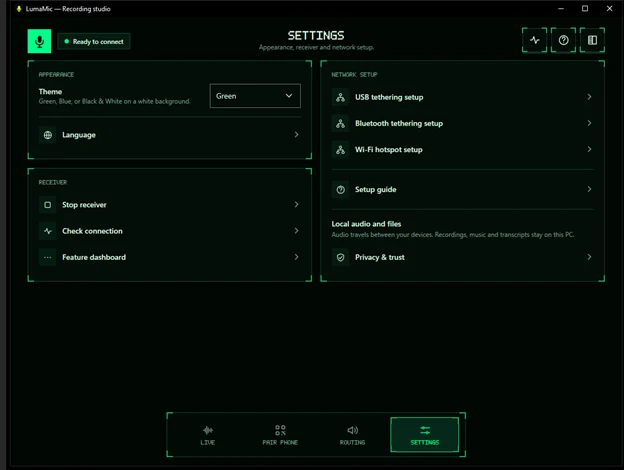
Guides for USB tethering, Bluetooth tethering and Windows Mobile hotspot, plus Check connection with a read-only firewall check.
Microphone for other apps
Routing, then Calls and games: Install Microphone Support, Set Up, and Make Default Microphone, with Restore Previous Microphone to undo. The status is read from Windows each time.
Phones at once
Allow up to four phones in Settings. Live shows every extra phone and its level, and recordings hold the real mix of all of them.
From your phone
Recordings sent from the phone land in their own folder, checked by SHA-256, with Open in Studio and Show in folder.
Linux receiver
A self-contained x64 terminal receiver and recorder with a per-user installer, for servers and headless machines.
How it works
Pair once, connect in one tap
Both devices need to reach each other on the same Wi-Fi network or over USB tethering.
Open the receiver
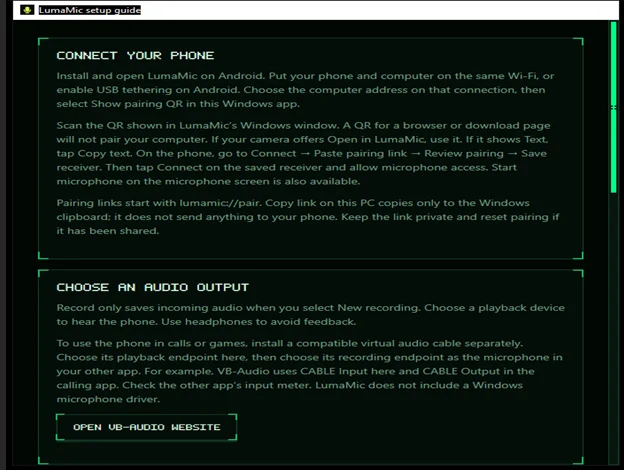
Run LumaMic on Windows (or the Linux receiver) and choose the address your phone can reach.
Show pairing QR
Choose Show pairing QR on the PC and scan it with the phone's camera. If it shows text, use Copy text on the phone.
Review & save
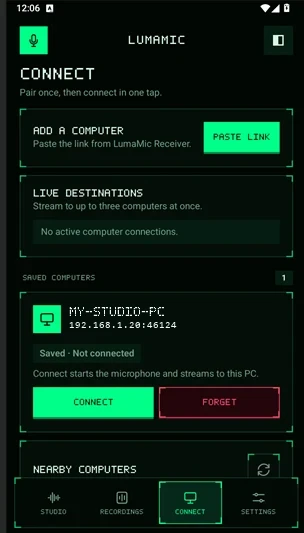
On the phone: Connect, Paste pairing link, Review pairing, Save receiver. Check the name, address and identity.
Connect
Tap Connect on the saved computer. It moves from Saved to Connected only after the encrypted handshake succeeds.
To use the phone as a microphone inside other Windows apps, open Routing, then Calls and games on the PC. It sets up VB-Audio's free VB-CABLE: LumaMic checks the package's fingerprint and VB-Audio's signature before anything runs, Windows asks for your permission, and you restart once. Then pick "CABLE Output" as the microphone in your app. Recording to files works without it.
Screens
Inside the Android app
Real screens from the current build. Switch the site theme to see them in Green, Blue or Black & White.
Specifications
Technical details
| Version | 0.13.1 (Android version code 21), review release dated 23 November 2026 |
| Android | Android 8.0 (API 26) or newer, targets API 36 |
| Windows | Windows x64, single self-contained executable (includes the .NET runtime) |
| Linux | x64 terminal receiver and recorder, per-user installer |
| Audio format | Mono, 48 kHz, 16-bit PCM in 20 ms frames, with optional lossless compression |
| Security | TLS with SHA-256 certificate pinning, pairing credentials encrypted with Android Keystore (AES-GCM) |
| Network | Wi-Fi, USB tethering, Bluetooth PAN and Windows Mobile hotspot (all over local IP). TCP 46124 for audio, UDP 46125 for discovery |
| Destinations | Up to 3 paired computers per microphone session; up to 4 phones into one computer |
| Other apps | Through VB-Audio's VB-CABLE on Windows (Zoom, Teams, Meet, Discord, OBS); a LumaMic microphone driver is planned |
| Phone export | WAV, AAC-LC / M4A, transcript TXT |
| PC export | WAV (always), optional M4A, TXT transcript, timed captions, project metadata |
| Languages | English and Hindi (some advanced tools in English) |
| Themes | Green, Blue, Black & White |
| Libraries | Android platform APIs, plus Google Play Billing for the Pro purchase only; Windows uses .NET platform APIs |
| Purchase | Free download, one-time LumaMic Pro unlock through Google Play |
Privacy
Your voice stays yours
LumaMic has no accounts, no advertising or analytics SDKs, no automatic crash uploads and no LumaMic cloud. Audio only goes to the computers you paired.
Read the privacy noticeVisible microphone
Capture starts only from a visible action and always shows a notification with Stop. Never on launch or boot.
Local storage
Recordings and drafts live in app-private storage. They are excluded from cloud backup and removed on uninstall.
Mute means silence
Mute replaces outgoing and recorded audio with silence, and stays muted through reconnects.
Purchases
Google Play handles payment. Google's signed receipt goes only to the computers you paired, inside the encrypted connection, and is checked offline.
Pricing
One purchase, every device
LumaMic is a free download from Google Play. A one-time LumaMic Pro purchase unlocks the whole app. There's no subscription and no account.
- One payment: Google Play shows the price in your currency and handles refunds under its own policy.
- Your PC comes with it: the Windows app unlocks when your Pro phone connects once, and keeps working offline.
- New phone? Use Restore Purchase with the same Google account.
- Works offline: the receipt is checked on the device, with no LumaMic server.
Everything included
Phone microphone, recording, the editor, Windows Studio, several phones into one PC, Hear yourself, the teleprompter and microphone setup for other apps.
Download only from Google Play
LumaMic checks its own signature. A copy re-signed and passed around on another website never unlocks, even with a copied receipt, and points you to Google Play instead.
Get LumaMic
Current builds
LumaMic 0.13.1 is a development review release. It is being tested on emulators and test devices before the Google Play release, where it will be a free download with a one-time Pro unlock.
Android
Review app (installs as "LumaMic Review"), Android 8.0+. The Google Play listing, with the Pro purchase, is in preparation.
Windows
Single x64 executable with receiver and Studio. Unsigned development build.
Linux
x64 terminal receiver and recorder with a guarded per-user installer.
Coming later
Signed store builds and LumaMic's own Windows microphone driver. macOS and iPhone versions are not planned for this release.
FAQ
Common questions
Can I use my phone as a microphone in Zoom, Discord or games?
Yes. On the PC, open Routing, then Calls and games. Install Microphone Support sets up VB-Audio's free VB-CABLE (Windows asks for permission, then you restart), Set Up sends LumaMic into it, and you pick "CABLE Output" as the microphone in Zoom, Teams, Meet, Discord or OBS. Make Default Microphone does that for every app at once, and Restore Previous Microphone puts your old one back.
Do I need a computer to record?
No. Choose Recordings, then New recording, or press Record in Studio. Recordings are saved on the phone and can be edited and exported there.
Does it work over Bluetooth or USB?
LumaMic uses an encrypted local IP connection. That works over Wi-Fi, Android USB tethering, Bluetooth tethering (PAN) and a Windows Mobile hotspot. Raw Bluetooth audio and direct USB accessory audio are not supported.
Is my audio uploaded anywhere?
No. There is no LumaMic cloud. Audio goes only to the computers you paired, over pinned TLS. It leaves your devices only if you share or export it yourself.
What does the round-trip figure mean?
It is the measured protocol response time between phone and PC. It is not a measurement of total mouth-to-app latency.
Can the phone transcribe my recordings automatically?
Not on the phone yet: you can type or paste a transcript. On Windows, Studio can use the installed offline speech engine when one is available.
How much does LumaMic cost?
It's a free download with a one-time LumaMic Pro purchase that unlocks everything. Google Play shows the exact price in your currency. There's no subscription.
Do I have to buy it again for my PC?
No. The Windows app unlocks when a phone with LumaMic Pro connects to it once, then keeps working offline.
Can I get LumaMic from another website?
Please don't. Only the Google Play version is official. Copies re-signed on other websites never unlock and may contain malware.
Is there an iPhone or Mac version?
Not at this time. LumaMic runs on Android, with receivers for Windows and Linux.
