Your proxy, your rules
ProxyBridge sends the Android apps you choose through your own SOCKS5 or HTTP(S) proxy, with no root. It checks TLS properly, shows where your traffic really exits, and blocks traffic when the proxy fails, so nothing slips out the wrong way.

Overview
A real proxy client, not a VPN service
ProxyBridge doesn't sell you servers. You bring your own proxy, from your company, your provider or your own server. ProxyBridge uses Android's built-in VPN interface to send the chosen apps through it, with no root.
Pick your apps
Choose apps from a visual picker, or leave it empty to route everything except ProxyBridge itself. Add rules for domains, IP ranges and ports.
One-tap connect
The pixel power key on Home, a notification with Disconnect, a Quick Settings tile, three home-screen widgets, shortcuts, and Connect & Go to open an app once the tunnel is ready.
Honest status
Routing means the engine is ready. Connected appears only after real traffic has passed through your proxy. A failing website is shown separately from a failing proxy.
Protocols
Four protocols, verified TLS
HTTPS and SOCKS5-over-TLS encrypt the link to your proxy and require a valid certificate that matches the hostname. There is no option to skip certificate checks.
- SOCKS5, including UDP for providers that support it
- SOCKS5-over-TLS, encrypted, TCP only
- HTTP CONNECT and HTTPS CONNECT
- Username and password login, private CA bundles, SPKI pinning, and client certificates from Android KeyChain
- Import by URL, in bulk, from a QR code or an image, or from a reviewed HTTPS subscription
Paste a proxy URL
Example formats (documentation hosts):
socks5://user:password@proxy.example:1080
socks5s://user:password@proxy.example:443
http://user:password@proxy.example:8080
https://user:password@proxy.example:443
The provider form socks5://host:port:user:password is also accepted. Percent-encode reserved characters, such as %40 for @.
Features
Everything in one app
Twelve areas, each with clear limits so you always know what it does and what it doesn't.
Profiles
Up to 200 profiles with search, favorites and sorting. Add, edit, duplicate, bulk import, recents, QR import and reviewed subscriptions.
Measurements
Staged diagnostics and batch checks of HTTPS, DNS over TCP or DoH, and SOCKS5 UDP. Optional encrypted history of 200 results.
Proxy selection
Up to 16 backups per profile. Use saved order, prefer the fastest healthy proxy from fresh measurements, or keep sticky per app or destination.
Routing rules
Proxy or block by app, domain, IP range (CIDR) and port, with an offline explainer and shared rule collections. First match wins.
Live connections
An optional per-connection monitor: destination, protocol, app, matching rule, proxy used, outcome and bytes. Never packet contents.
Live speed
Download and upload speed with a 20-second pixel chart for each, on Home and in the globe's corner, plus optional encrypted summaries of your last 50 sessions.
DNS
Remote hostname DNS, DNS over TCP through the proxy, or verified DNS-over-HTTPS with optional cache, resolver policy, fallbacks and filtering.
Network automation
Recover after network changes or reboot, and switch profiles automatically on Wi-Fi, mobile data or Ethernet. Manual override is always there.
LAN sharing
Share your proxy with other devices on your network through an authenticated SOCKS5/HTTP service and a temporary PAC URL. Up to 8 clients for 15 minutes.
Kill switch
On by default: a failing proxy never lets traffic leak out directly. The tunnel stays up while the engine restarts, so routed apps stay protected.
Encrypted backups
Back up all profiles to a .pbbackup file with AES-256-GCM and PBKDF2 (600,000 rounds). Review what will be restored first.
Timezone match
Warns when your phone's timezone doesn't match the proxy exit and opens Date & time settings. Managed devices can match it automatically.
New in 0.8.1 to 0.10.1
What’s new
ProxyBridge is now free to use, with a one-time Pro unlock. It also gained home-screen widgets, live speed, and an exit-IP check that gets through more proxies.
Free + Pro
Free covers one proxy with the kill switch, exit-IP check, globe, IP log and ad blocking. A one-time Google Play purchase unlocks the rest. 0.10.0
Official copy check
The app checks its own signing certificate. A copy re-signed elsewhere is flagged as UNOFFICIAL COPY and Pro stays locked. Works offline, sends nothing. 0.10.0
Home-screen widgets
One-Tap Connect (1×1), Live Speed (4×1) and Status (3×2), drawn in the pixel style and following your theme. 0.9.0
Bottom bar everywhere
Every screen now shows Home, Profiles, Logs and Settings, with the section you came from highlighted. 0.9.0
Live speed
Connection Activity has two columns, Download and Upload, with live speed, a 20-second chart and session totals. The globe shows the speed too. 0.8.2
Exit IP that gets through
Seven check services in turn, ending with Cloudflare, which proxies can’t block without breaking the web. Timezone can come from the country. 0.8.3–0.8.6
Honest reasons
When a check fails, the box says why: no answer in time, refused, rate-limited, wrong login or unreachable, with the exact technical error in details. 0.8.4–0.8.5
Ad blocking that works
Blocklists and domain rules now apply even when Android’s Private DNS or Chrome’s Secure DNS is on. LAN Sharing keeps running while the VPN connects. 0.8.1
Pixel details
A pixel progress bar while connecting and checking, pixel tick boxes everywhere, a roomier globe, and tiled popup lists. 0.8.6–0.8.7
Added in 0.8.0
- Stall watchdog rebuilds a tunnel that shows Connected while nothing loads.
- Block QUIC per proxy, so videos fall back to TCP on proxies without UDP.
- Next Proxy and Change IP in the notification, next to Disconnect.
- Edit List, Delete All, Remove Failed, and sorting by Newest, Last Used or Fastest.
- Share to ProxyBridge and opening .txt, .json and .conf files, through the import review.
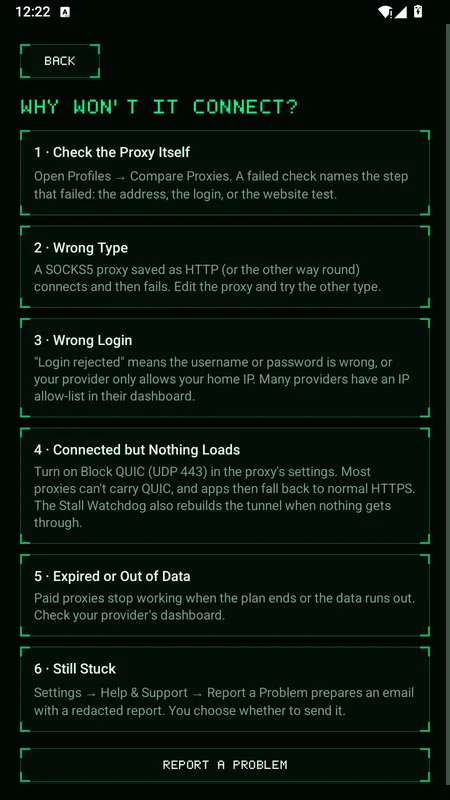
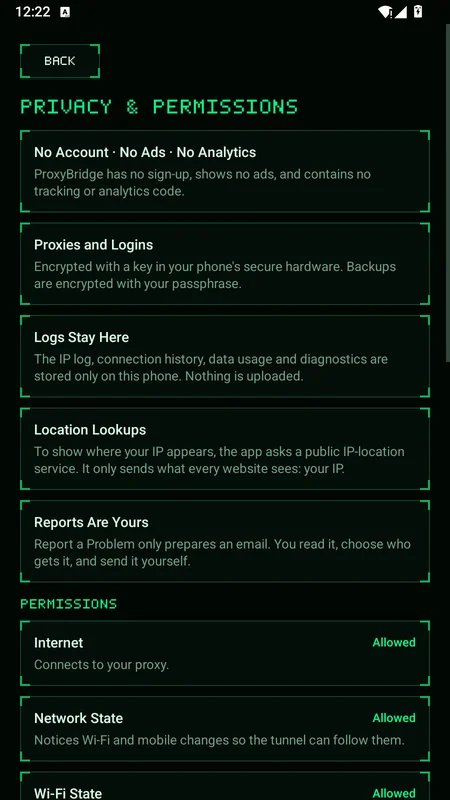
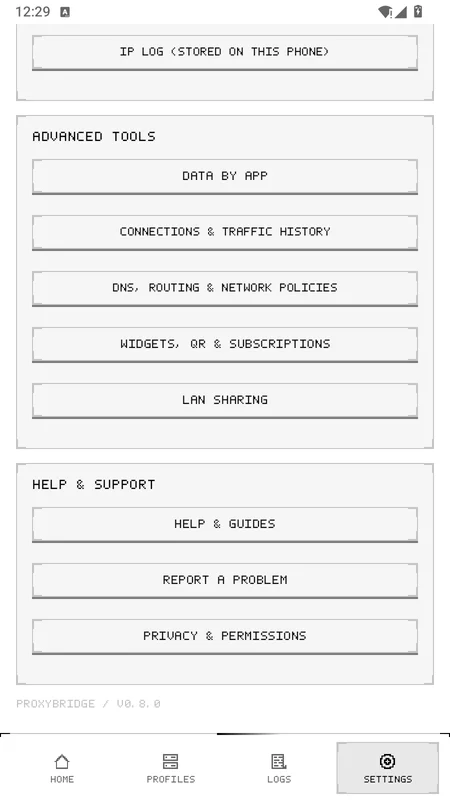
- Safe updates, Help & Guides, Report a Problem and a Privacy & Permissions page.
Added in 0.7.0
- Local network access while connected, and Wi-Fi sign-in pages that work with the kill switch on.
- IP rotation links, per-profile data meters and plan expiry reminders.
- Connect to Best, QR sharing and App lock.
- Eight interface languages beyond English, including Hindi, Spanish, Portuguese and Chinese.
- Tasker and MacroDroid control, plus a daily connect and disconnect schedule.
- Android TV and Fire TV, Data by App and bundled ad, tracker and telemetry blocklists.
Shield
Check for leaks in one screen
Shield gathers the protection tools in one place, with plain-language results and one-tap fixes.
- Leak test that refreshes your exit IP and re-scores live.
- Stay-protected checklist: always-on VPN, blocking without VPN, battery settings and more.
- App firewall: cut chosen apps off the internet entirely.
- Speed test comparing latency and download speed through the proxy and over the direct network.
- IP log: a timeline of every direct and proxy-exit IP the app observed, stored on the phone.
Illustration of Shield's checklist, using the app's own wording.
Screens
Inside the app
Real screens from the 0.8 builds, using a local test proxy and documentation addresses. The Home screen at the top of this page is a live recreation of the current 0.10 Home.
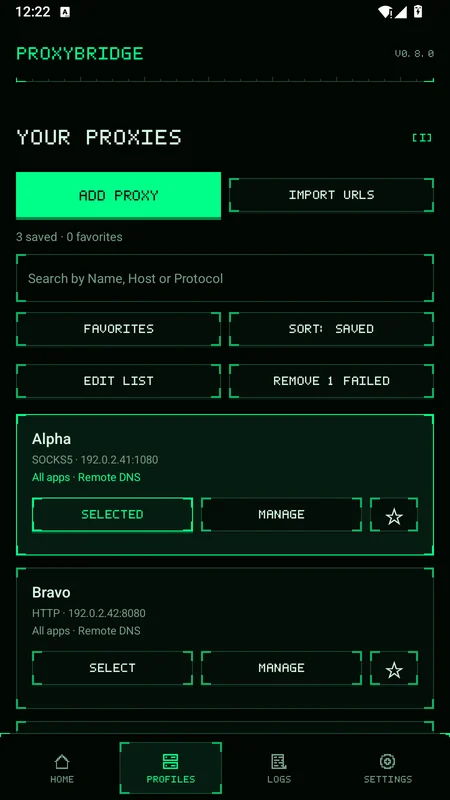
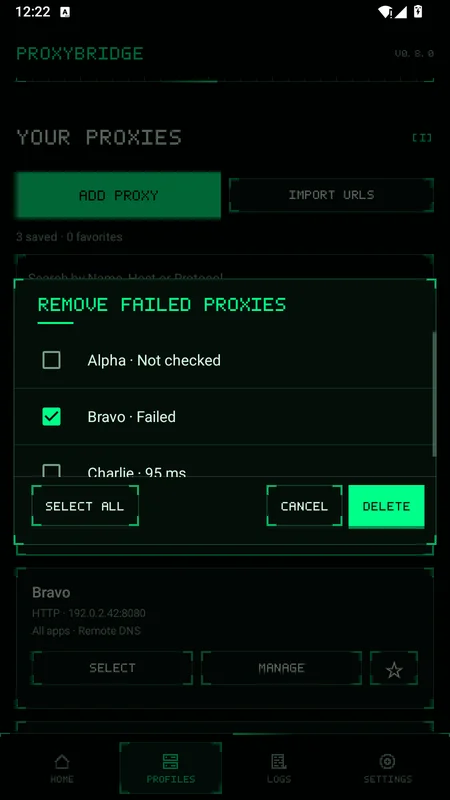
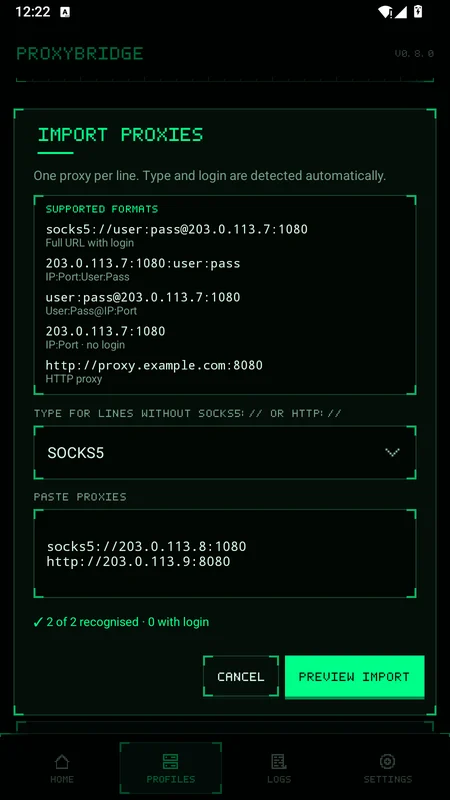
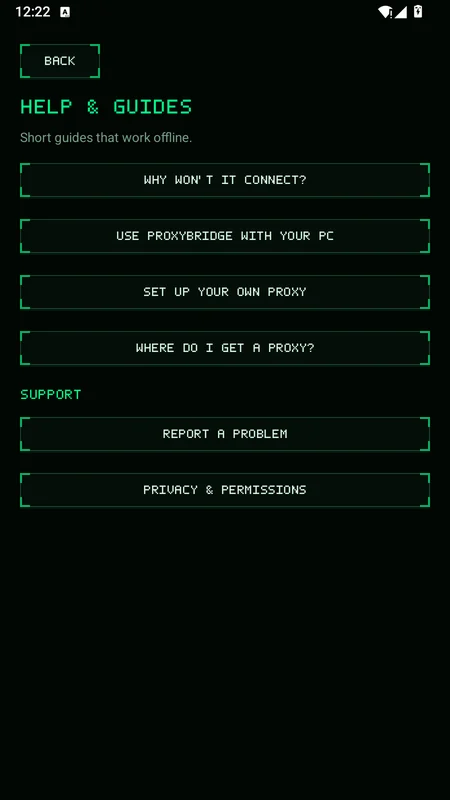
Globe & street map
See where your traffic exits
The app's offline globe, drawn from real country outlines bundled in the app, traces the tunnel from your phone to the proxy exit and labels it with the IP, city, country and flag. The globe here is the same drawing code, running live in your browser.
- IP location is explained on the Welcome screen and can be turned off in Settings at any time.
- The lookup goes through your proxy, never around it, and never receives your proxy login.
- No GPS: this is an estimate of where the IP is, not where your phone is.
- Street map shows real OpenStreetMap roads around that point, with pan, pinch and zoom.
- While connected, the corner shows live download and upload speed.
- A clear fallback view appears on devices without 3D graphics support.
Live demo: example proxy exits using documentation IP addresses. Show my IP asks ipapi.co (or ipwho.is) for your IP's approximate location. Nothing is sent until you press it.
Routing & DNS
Choose how names are resolved
Each DNS mode suits different rules. ProxyBridge tells you which combinations work instead of guessing.
| Mode | How it works | Best for |
|---|---|---|
| Remote hostname | The proxy resolves names. Apps get temporary local addresses while the hostname is sent to the proxy. | Exact and wildcard domain rules |
| DNS over TCP | DNS queries travel through the proxy over TCP port 53 to a resolver you choose. | Real DNS records, per-app rules (Android 10+) |
| DNS-over-HTTPS | Queries become verified DoH requests through the proxy, with optional cache, suffix-based resolvers, up to 3 fallbacks and domain filtering. | Encrypted lookups, per-app rules, blocklists |
Security
Careful by design
No TLS bypass
Certificate and hostname checks are mandatory. ProxyBridge never decrypts website TLS or installs an interception certificate.
Isolated engine
The tunnel engine runs in its own process. If it restarts, the tunnel stays up and keeps traffic captured.
Settings snapshot
An active connection keeps its settings. Disconnect before editing, so credentials and rules can't change mid-session.
Private by default
Screenshots are allowed, with an optional protected-window setting. Proxy passwords and the IP log can sit behind App lock.
How it works
Connected in four steps
Add a proxy
Choose Add proxy or Import URLs. Enter the protocol, server, port and login.
Pick apps & DNS
Choose a DNS mode and, optionally, the apps to route. Save and select the profile.
Tap power
Tap the pixel power key and approve Android's VPN request. Allow notifications to keep the Disconnect control handy.
Use your apps
Open a routed app. The status changes to Connected once traffic has really passed through your proxy.
For protection even if the app is closed or the phone restarts, turn on Always-on VPN and Block connections without VPN in Android's VPN settings. ProxyBridge has a shortcut to that screen.
Specifications
Technical details
| Version | 0.10.1 (version code 21), review release dated 23 November 2026 |
| Package | com.proxybridge.app |
| Android | Android 8.0 (API 26) or newer, targets API 36. ARM64 or x86-64 |
| Android TV | Leanback launcher, D-pad and keyboard navigation, Fire TV |
| Protocols | SOCKS5 (TCP and UDP), SOCKS5-over-TLS (TCP), HTTP CONNECT, HTTPS CONNECT |
| Authentication | Username and password, private CA bundle (1 to 8 certificates), SHA-256 SPKI pinning, KeyChain client certificates |
| DNS | Remote hostname, DNS over TCP, DNS-over-HTTPS with cache, policy and filtering |
| Exit-IP check | Through your proxy, in order: ipapi.co, ipwho.is, ipinfo.io, geojs.io, ip.sb, Cloudflare trace, api.ipify.org |
| Widgets | One-Tap Connect (1×1), Live Speed (4×1), Status (3×2) |
| Limits | 200 profiles, 16 backups per profile, 100 rules, 8 subscription sources, 8 LAN clients |
| Backup | AES-256-GCM, PBKDF2-HMAC-SHA256 with 600,000 iterations, 12+ character passphrase |
| Languages | English plus Spanish, Persian, Hindi, Indonesian, Portuguese, Russian, Turkish and Chinese |
| Themes | Green, Blue, Black & White |
| Root | Not required. Uses Android's VpnService |
| Purchase | Free, with a one-time ProxyBridge Pro unlock through Google Play (Google Play Billing library) |
Privacy
We don't see your traffic
ProxyBridge connects your phone to the proxy you chose. We run no servers in the middle, and your profiles, logs and history stay on your phone.
Read the privacy noticeLookups through your proxy
The IP location check and street map tiles travel through your proxy and never receive your proxy login. You can turn IP location off.
On-device history
Measurements, session summaries, data meters and the IP log are kept on the phone, and you can clear them.
Offline blocklists
Ad, tracker and telemetry lists are bundled in the app. Nothing is downloaded to use them.
Purchases
Google Play holds the Pro purchase on your Google account. ProxyBridge still has no account and no server, and the copy check sends nothing.
Free & Pro
Free to use, one-time Pro
ProxyBridge is free with one saved proxy. A one-time ProxyBridge Pro purchase through Google Play unlocks the power tools. There's no subscription, and Pro works offline once bought.
Everything you need for one proxy
- One saved proxy, Connect and Disconnect
- Kill switch and leak Shield
- Exit-IP check, globe and IP log
- Ad, tracker and telemetry blocking
- All themes and languages
- Restore the automatic pre-update copy
For long proxy lists and power use
- More than one saved proxy: Add, Import, QR import and Subscriptions
- Compare Proxies, Connect to Best and Next Proxy
- Change IP: button, notification action and automatic rotation
- Home-screen widgets
- Data by App and LAN Sharing
- Encrypted backup and restore
Download ProxyBridge only from Google Play. A copy re-signed and passed around on another website shows UNOFFICIAL COPY in Settings and Pro stays locked. For an app that carries your traffic, an unofficial copy may also contain malware.
Get ProxyBridge
Current builds
ProxyBridge 0.10.1 is a development review release, in testing on emulators and devices before the Google Play release. You need your own proxy server or provider account.
Android & Android TV
One APK for phones, tablets and TV, Android 8.0+ on ARM64 or x86-64. The Google Play listing, with the Pro purchase, is in preparation.
Upgrading from an early build?
Builds before 0.7.0 installed as a separate app. Use Encrypted backup & restore to move your proxies, then uninstall the old build.
FAQ
Common questions
Will an update erase my proxies?
No. From 0.8.0, ProxyBridge copies your profiles before every update. If anything looks wrong, open Profiles, then Encrypted backup & restore, then Restore from before the update.
Is ProxyBridge free?
Yes, with one saved proxy, the kill switch, the exit-IP check and globe, the IP log and ad blocking. A one-time ProxyBridge Pro purchase through Google Play adds more proxies, Change IP, widgets, Data by App, LAN Sharing and encrypted backups.
I bought Pro. How do I get it on a new phone?
Install ProxyBridge from Google Play with the same Google account, then open Settings, then ProxyBridge Pro, and press Restore Purchase.
Settings says UNOFFICIAL COPY. What does that mean?
Your copy wasn’t signed by us: someone re-packaged it, and it may contain malware. Uninstall it and install ProxyBridge from Google Play.
Does ProxyBridge include proxy servers?
No. ProxyBridge is a client. You supply your own proxy endpoint and login, from a provider, your workplace or your own server.
Why does Android say it's a VPN?
Android's VpnService is the official, root-free way to capture an app's traffic. ProxyBridge uses it to send that traffic to your proxy; it is not a VPN service with its own servers.
Is my connection encrypted?
HTTPS proxies and SOCKS5-over-TLS encrypt the link to your proxy. Plain SOCKS5 and HTTP do not. Websites that use HTTPS stay encrypted end to end in every mode.
What happens if my proxy goes down?
With the kill switch on (the default), traffic is blocked rather than sent directly. Backups take over for new connections, if you've added any.
Can I route only some apps, or some websites?
Yes. Pick apps, and add rules by domain, IP range or port to proxy or block them. Per-app rules need Android 10+ and TCP DNS or DoH; domain rules need remote hostname DNS.
It says Connected, but pages won’t load. What now?
The stall watchdog rebuilds a tunnel that stops passing traffic. If videos or some sites still hang, turn on Block QUIC in that proxy’s settings: many proxies don’t carry UDP, and apps then fall back to TCP. Help & Guides in the app walks through the other common causes.
Does it work on Android TV?
Yes. ProxyBridge appears in the TV launcher and every control can be reached with the D-pad, with bright focus brackets.
Does the globe use my GPS?
No. It shows the approximate location of your exit IP address, from an IP information service. You can turn IP location off in Settings.