AlphaCode Gen · Independent app studio

Tools that stay on your device

We build original, native apps for Android, Android TV, Windows and Linux. Each one is fast, works locally, and does what its screen says. No ads, no accounts, no tracking SDKs.

02Apps in active development
04Platforms
00Ads or trackers
00Third-party UI libraries

Our platforms

One studio, four platforms

Every app is written natively for the platform it runs on, using the platform's own APIs. The same pixel HUD design language carries across all of them.

Android

Phones and tablets, Android 8.0 (API 26) to Android 16 (API 36).

LumaMicProxyBridge
Android TV

Leanback launcher, D-pad focus with bright corner brackets. Fire TV and keyboard too.

ProxyBridge
Windows

A single self-contained x64 app: receiver, live meters and a full voiceover Studio.

LumaMic
Linux

A self-contained x64 terminal receiver and recorder with a per-user installer.

LumaMic

Our apps

The apps we build

Two apps, one design language. Open an app's page for its complete feature list, screens, specifications and privacy details.

LumaMic

Phone microphone · voice recorder · voiceover studio

Turn your Android phone into a private, encrypted microphone for your PC. Record voiceovers on the phone or on Windows, then trim, cut, add music, shape your voice with EQ and compression, and export. Everything stays on your own devices.

  • Your phone as the mic in Zoom & Teams
  • Certificate-pinned TLS pairing
  • Local recording without a PC
  • Editor with Undo/Redo & drafts
  • EQ, compressor, tempo & pitch
  • WAV and AAC/M4A export
  • Windows Studio and Linux receiver
  • Up to 4 phones into one PC
v0.13.1 AndroidWindowsLinux One-time Pro Review release
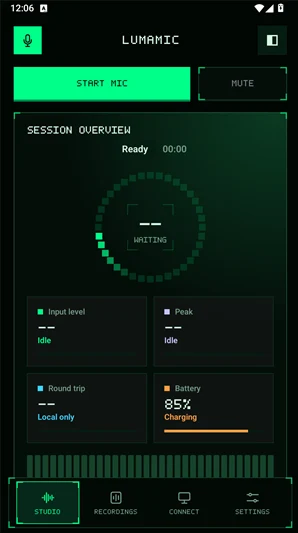
LumaMic Studio screen with Start Mic and Mute keys, the pixel level ring and four live tiles: input level, peak, round trip and battery.

ProxyBridge

Proxy client · per-app routing · no root

Route the apps you choose through your own SOCKS5 or HTTP(S) proxy, without root. ProxyBridge verifies TLS, shows where your traffic really exits on an offline 3D globe, and gives you a kill switch, routing rules, DNS-over-HTTPS and a leak-checking Shield.

  • SOCKS5, SOCKS5-over-TLS, HTTP, HTTPS
  • Per-app, domain, IP and port rules
  • Kill switch and leak Shield
  • Verified DNS-over-HTTPS
  • Offline 3D globe of your exit IP
  • Up to 16 backup proxies
  • Home-screen widgets
  • Live download & upload speed
v0.10.1 AndroidAndroid TV Free + Pro Review release

How we build

Six rules every app follows

These rules come straight from the engineering notes behind each app. They decide what we ship, and what we refuse to ship.

Local first

Your recordings, proxies, drafts and history stay on your device. Data only moves when you stream, share or export it yourself.

No ads, no trackers

No advertising SDKs, analytics SDKs, accounts, cloud relays or automatic crash uploads. We don't sell attention or data.

Verified security

Certificate pinning, Android Keystore encryption, AES-256-GCM backups and strict hostname checks. No "trust all" shortcuts, ever.

Real data only

No fake meters, fake "connected" states or placeholder buttons. Every chart and status shows a real measurement, or says it can't.

Original code

Our application, audio DSP, protocol and UI code is written for these apps, on the platforms' own APIs, with no third-party UI libraries. The one outside library is Google Play Billing, for Pro purchases.

Visible control

The microphone only starts from a visible action, with a notification and a Stop key. VPN consent, permissions and pickers stay with the system.

Design language

Pixel HUD, in three themes

Our apps share one interface: a hand-drawn pixel font, square panels with corner brackets, and solid neon keys with a bevel. Pick a theme the way you would inside the apps. This site follows along.

  • Green is the default: neon #00FF88 on green-black.
  • Blue uses ice-blue #38B6FF on blue-black.
  • Black & White is a light theme with text contrast of at least 4.5:1.
  • Red and amber keep their warning meaning in every theme.
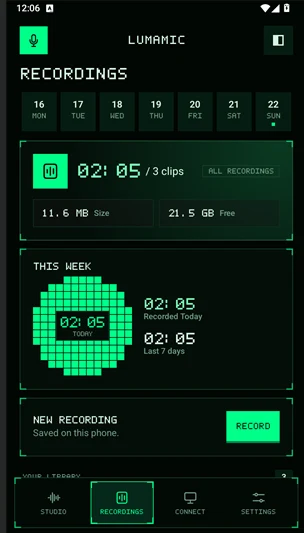
LumaMic Recordings screen: a seven-day strip, total recorded time and a pixel disc chart for this week.
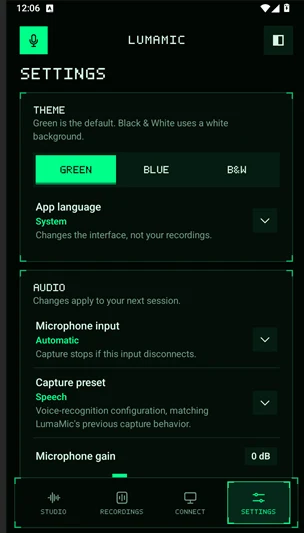
LumaMic Settings screen with the Theme choice of Green, Blue or Black and White, app language and audio input.

At a glance

Apps and platforms

Which platforms each app supports, with current version and requirements
AppAndroidAndroid TVWindowsLinuxVersionRequires
LumaMicYes-YesTerminal0.13.1Android 8.0+, Windows x64, Linux x64
ProxyBridgeYesYes--0.10.1Android 8.0+, ARM64 or x86-64, your own proxy

What's next

On the road to the store

This is the work left before public releases. We only mark an item done once it has been tested on real devices.

Full changelog
  1. Now

    Real-device testing

    • Physical phones, Windows PCs and live proxy providers, beyond emulators.
  2. Next

    Google Play launch

    • Production signing, store listings and real Pro purchases for both apps.
  3. Next

    Accessibility pass

    • TalkBack, large text, keyboard and high-DPI checks across every screen.

Release status

Development review releases

LumaMic 0.13.1 and ProxyBridge 0.10.1 are in active review on emulators and test devices. Google Play listings, with their one-time Pro purchases, follow once production signing and real-device testing are complete. We publish what has been verified, and what has not.

LumaMic 0.13.1Android review APKWindows x64 (unsigned)Linux x64
ProxyBridge 0.10.1Android APKAndroid TV